- HOME
- OPINION
- ON GROUND
- INTERVIEW
- Neta Profile
- Editor's Pick
- INDIA
- NewsGram USA
- WORLD
- न्यूजग्राम
- POLITICS
- ENTERTAINMENT
- CULTURE
- LIFESTYLE
- ECONOMY
- SPORTS
- Jobs / Internships
- Misc.
- NewsGram Exclusive
By Zafar Jutt
Turning your Midjourney creations into large, physical prints is an exciting step for any digital artist. The challenge, however, is transforming a standard-resolution image into a crisp, detailed 8K masterpiece ready for printing. Many artists immediately look to powerful tools like Magnific AI, but its high price tag and complex features can be more than what's needed.
Is there a better way to get professional print-quality results without the steep monthly fee? This comparison explores how ImgUpscaler AI provides a powerful, practical, and affordable solution for artists. We'll break down Magnific AI vs. ImgUpscaler AI to help you decide which tool is the right fit for scaling your digital art for the real world.
Understanding the core philosophy behind each tool is key. Magnific AI is a generative upscaler, meaning it actively invents new details to fill in the extra resolution. ImgUpscaler AI is an enhancement tool, focusing on sharpening and clarifying the details that already exist in your original image. This fundamental difference impacts everything from cost to creative control.
Overview
Magnific AI has earned a reputation as a highly sophisticated upscaler that doesn't just enlarge images, it reimagines them. Using its "creativity" slider, you can instruct the AI to add new textures, patterns, and details. This can transform a simple image into something incredibly intricate. However, this generative process can sometimes alter the original vision of the artwork, introducing elements you didn't intend.
Key Features
* Generative Upscaling: Its main feature is the ability to add new, complex details to an image as it increases the resolution.
* Creativity Control: A unique slider allows you to dictate how much new information the AI should invent, from subtle enhancements to a complete re-texturing.
* Style Transfer: The tool can upscale an image while applying a specific textural style, described via a text prompt.
* High-Resolution Output: It can upscale images up to 16x their original size, achieving very high resolutions for massive prints.
Pros & Cons
* Pros: Capable of producing incredibly detailed and complex results, offers a high degree of creative input for reimagining art, and is favored by some professionals for fantasy and abstract work.
* Cons: Extremely expensive with its lowest plan starting around $40 per month, has a significant learning curve, and the generative process can "over-bake" images, adding unwanted artifacts or straying too far from the source.
Best For
Magnific AI is best suited for professional artists and high-end studios with a considerable budget. It excels in projects where the goal is to add fantastical, intricate details rather than simply preserving the original artwork. If you want an AI to act as a creative partner in generating new textures, it’s a powerful option. For most users, however, its cost and complexity are overkill.
Overview
ImgUpscaler AI is built for artists and creators who love their original artwork and want to prepare it for high-resolution printing with clarity and fidelity. Instead of inventing new details, its advanced algorithms enhance and sharpen what's already there. This ensures your final 8K print is a true, high-definition version of your Midjourney creation, preserving your unique style and composition. It’s a direct path from digital art to print-ready file.
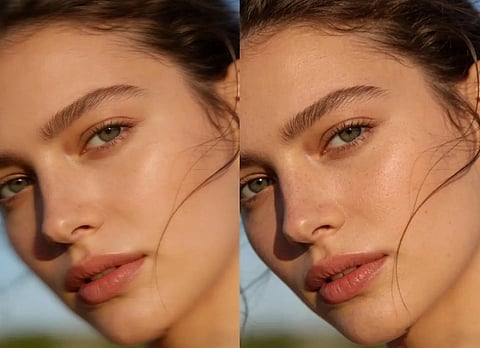
This platform offers a dedicated Image Upscaler designed for clean, fast, and accurate enlargements. It intelligently sharpens lines and clarifies textures without introducing unwanted changes, making it a reliable tool for getting your work ready for the printer. The focus is on quality and faithful reproduction at a much larger scale.
For artists who need to make final tweaks, the integrated AI Photo Editor provides a suite of essential tools. You can make subtle adjustments to color, contrast, and brightness, or even remove distracting elements from the background. This combination of upscaling and editing makes it a complete solution for preparing your art for exhibition or sale.
Key Features
* Enhancement Upscaling: Increases image resolution up to 8K while preserving the integrity and style of the original artwork.
* AI Detail Sharpening: Intelligently sharpens existing lines, textures, and details without creating a processed or artificial look.
* User-Friendly Interface: The platform is designed to be simple and intuitive, allowing you to get professional results in just a few clicks.
* Integrated Editing Suite: Includes tools for photo editing, object removal, and color correction, providing everything needed for final touch-ups.
Pros & Cons
* Pros: Significantly more affordable and accessible, preserves the artist's original vision, extremely easy to use, fast processing speeds, and offers a versatile set of editing tools in one place.
* Cons: Does not generate new creative details, which might be a drawback for users who specifically want that feature.
Best For
ImgUpscaler AI is the ideal choice for Midjourney artists, photographers, and graphic designers who need to produce high-quality prints. It’s perfect for anyone who wants to upscale their work reliably and affordably without altering the core artistic style. If your goal is to create a stunning, high-resolution version of the art you already made, this is the tool for the job.
To make the choice clearer, here's a direct comparison of the most important factors.
Choosing the right upscaler depends entirely on your goal and your budget.
Magnific AI is an impressive piece of technology, but it’s a niche tool for a specific purpose: generative re-texturing. For the artist who wants to collaborate with an AI to invent new, complex details and has the budget to support it, it can be a powerful creative partner. However, for the vast majority of Midjourney users who simply want to print their beautiful creations in high resolution, it's an unnecessarily expensive and complicated solution.
ImgUpscaler AI emerges as the clear winner for practical, professional-level upscaling. It respects your original artwork, delivering a crisp, clean, and detailed 8K version that is true to your vision. Its combination of affordability, ease of use, and high-fidelity output makes it the superior choice for artists, designers, and creators who need to get their work print-ready without breaking the bank.
If you want to turn your digital art into stunning physical prints reliably and efficiently, ImgUpscaler AI provides all the power you need without the excessive cost.
Suggested Reading:
Subscribe to our channels on YouTube and WhatsApp
Download our app on Play Store

